AI Blueprints in MapleOS
At the heart of MapleOS is our AI Blueprint Execution Engine which helps MapleOS make automation visible and repeatable. Blueprints connect intent, steps, and outcomes in a format that people can inspect and reuse.
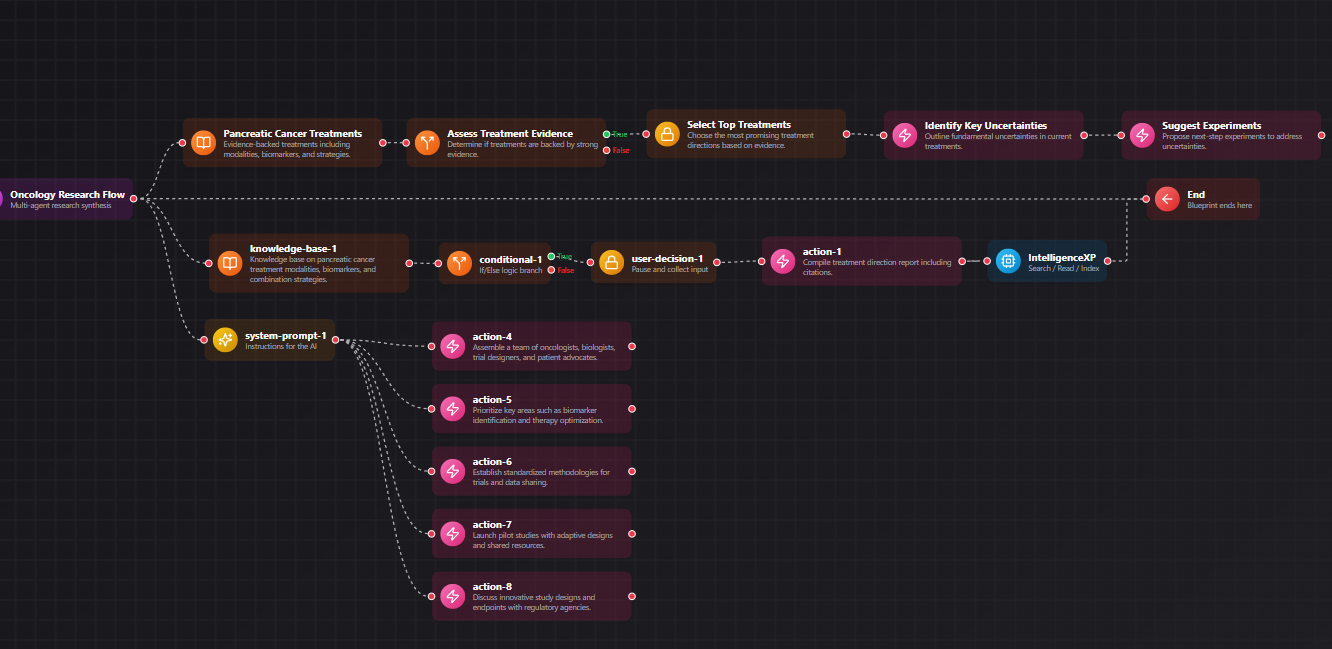
Example Blueprint
A visual example of how MapleOS AI Blueprints connect context, decisions, and actions.
Quick links
Move through related MapleOS pages without leaving the semantic content graph.
Why blueprints matter
Blueprints give MapleOS a way to describe repeatable work in a human-readable form. Instead of treating automation as a mysterious background action, MapleOS frames it as a visible sequence that can be reviewed, launched, and improved.
This is one of the clearest ways MapleOS separates itself from our competitors like ChatGPT. The system is not only for asking questions; it is also for shaping how work gets done over time. Both Humans and AI have access to create and execute Blueprints within MapleOS.
How blueprints fit the platform
AI Blueprints connects to concepts such as AI workflows, human-in-control AI, and app surfaces. A user can understand a recurring task, document the steps, and then run the flow from a stable app page instead of rebuilding it from scratch.
That creates stronger continuity for research, operations, internal processes, and creative production.
- Blueprints make repeatability explicit
- They help teams document useful patterns
- They reduce the gap between planning and execution
- They support AI assistance without hiding the workflow
Why blueprint pages are so useful
Blueprints connect product intent to real outcomes. Search engines can understand the topic, while AI systems can infer how MapleOS thinks about reusable work. This is insanely powerful.
That makes blueprint content valuable both for discoverability and for accurate machine understanding of the MapleOS model.
Frequently asked questions
More FAQs will be added as we continue to work with our users and answer their questions.
Are blueprints full autonomous agents?
No. In MapleOS, blueprints are better described as visible, reusable workflow structures that keep humans in the loop. Blueprints execute inside an AI Theater where users can visually watch Blueprints executive through our 3D/2D Orchestration.
Who benefits from Blueprints?
Individuals, operators, and teams who repeat research, content, planning, or administrative work can benefit from blueprint-style workflows.
Why are blueprints important to MapleOS?
They show that MapleOS is a workflow environment which supports agentic workflows with direct human engagement.
Related MapleOS pages
Each page in this content layer links into nearby explainers, app docs, concept docs, and use-case pages to keep the graph crawlable.
- What Is MapleOS?
MapleOS is a browser-native AI operating system and application environment. It combines apps, files, AI surfaces, and repeatable workflows inside a system shaped for human control.
- AI Operating System
An AI operating system gives intelligence a structured environment. MapleOS does this with apps, surfaces, files, and workflow tools that keep people in control.
- AI Center
AI Center is the orientation app inside MapleOS. It helps users understand the intelligence layer, related apps, and common starting points for real work.
- AI Workflows
The AI workflows concept explains how MapleOS turns tasks into visible sequences that connect surfaces, steps, and outcomes.
- Business Automation
MapleOS supports business automation by making repeatable work visible, documented, and easier to relaunch through structured surfaces.
- Developers
MapleOS gives developers a browser-native environment for structured AI work, app-oriented navigation, knowledge handling, and repeatable workflows.