AI Blueprints Concept
The AI Blueprints concept explains how MapleOS turns repeatable work into a stable pattern that users can inspect and reuse.
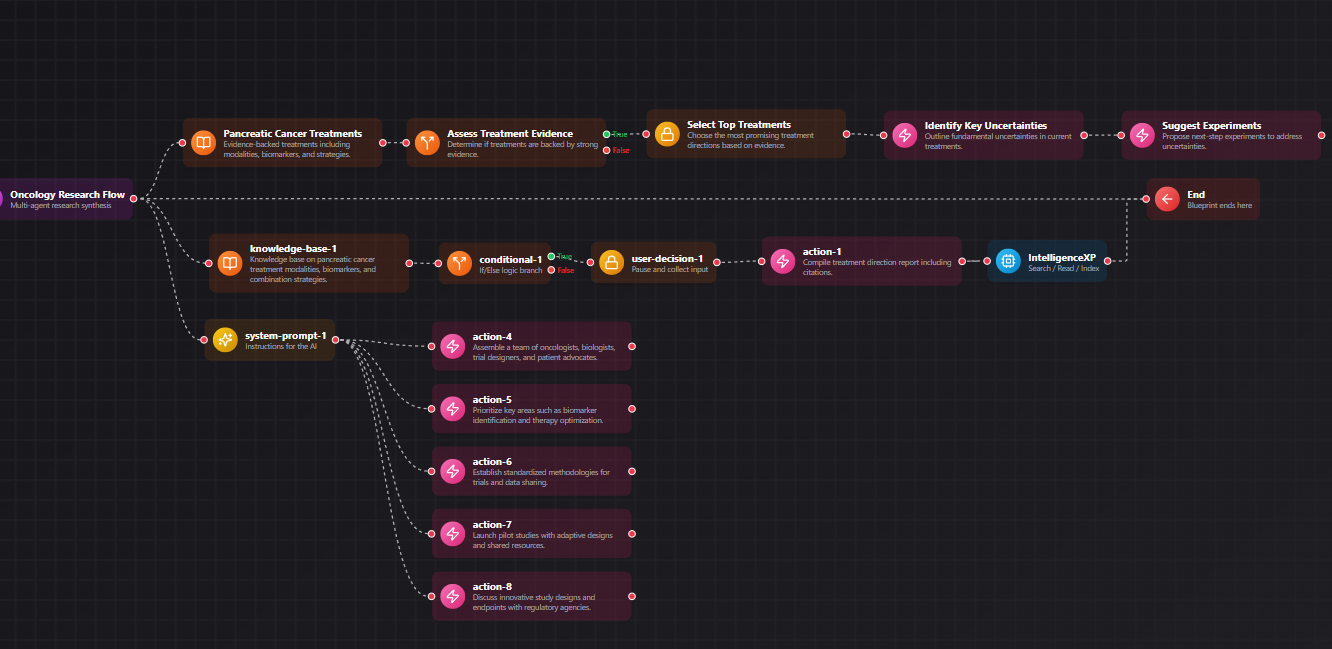
Example Blueprint
A visual example of how MapleOS AI Blueprints connect context, decisions, and actions.
Quick links
Move through related MapleOS pages without leaving the semantic content graph.
The idea behind blueprints
AI Blueprints is a concept about repeatability with visibility. Instead of burying automation behind opaque commands, MapleOS frames it as a reusable structure that can be described and relaunched.
That makes the concept valuable both to users and to AI systems trying to understand the product.
Why concept clarity matters
A concept page helps distinguish the idea of blueprint-driven work from the specific app surface where users interact with it. This keeps the information architecture clean and helps the linking graph stay strong.
It also improves the platform story by showing how MapleOS thinks about workflows, not just features.
Where this concept shows up
This concept connects directly to AI workflows, human-in-control AI, and business automation use cases. Those links help users understand where blueprint thinking becomes useful in practice.
It is one of the clearest semantic bridges from product language to real operational value.
Frequently asked questions
More FAQs will be added as we continue to work with our users and answer their questions.
Why not explain blueprints only on the app page?
Because the concept spans more than the app. It shapes how MapleOS thinks about repeatable work across the whole system.
What makes blueprints different from generic automation?
Blueprints emphasize visibility, reusability, and human readability instead of hidden one-click automation.
Which use cases fit blueprints best?
Business automation, content systems, recurring research, and repeatable internal workflows are all strong fits.
Related MapleOS pages
Each page in this content layer links into nearby explainers, app docs, concept docs, and use-case pages to keep the graph crawlable.
- Settings
Settings is the control surface inside MapleOS. It helps users shape how the environment behaves and reinforces the platform’s human-in-control philosophy.
- AI Center
AI Center is the orientation app inside MapleOS. It helps users understand the intelligence layer, related apps, and common starting points for real work.
- Business Automation
MapleOS supports business automation by making repeatable work visible, documented, and easier to relaunch through structured surfaces.
- Content Creation
MapleOS supports content creation by linking ideation, source gathering, drafting, and repeatable production workflows inside one environment.
- Developers
MapleOS gives developers a browser-native environment for structured AI work, app-oriented navigation, knowledge handling, and repeatable workflows.
- What Is MapleOS?
MapleOS is a browser-native AI operating system and application environment. It combines apps, files, AI surfaces, and repeatable workflows inside a system shaped for human control.