AI Blueprints App Docs
The AI Blueprints app gives MapleOS a repeatability surface where people can return to known workflow patterns instead of rebuilding them from scratch.
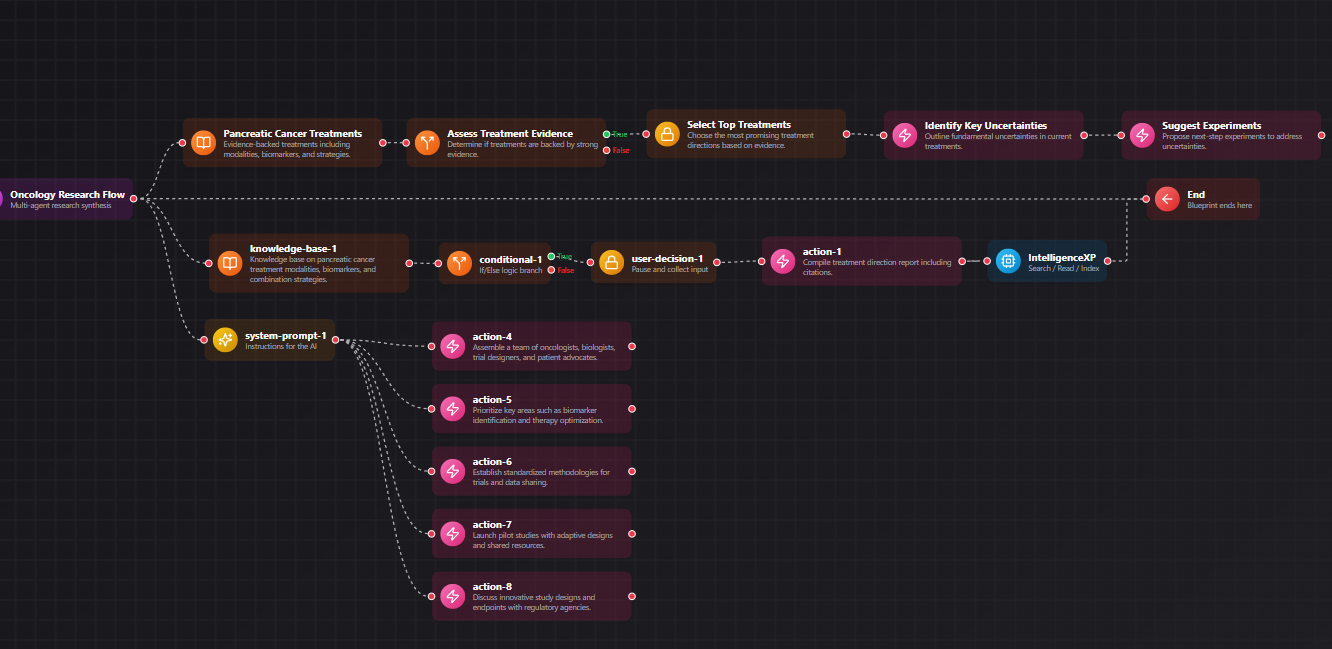
Example Blueprint
A visual example of how MapleOS AI Blueprints connect context, decisions, and actions.
Quick links
Move through related MapleOS pages without leaving the semantic content graph.
What the AI Blueprints app is for
The AI Blueprints app is where repeatable work becomes easy to relaunch. Instead of starting from a blank page every time, users can return to structured patterns that encode useful sequences of work.
This gives MapleOS a distinct workflow identity and helps explain how the platform moves beyond one-off prompting.
How it differs from the blueprint concept
The concept page explains what blueprints mean in MapleOS. This app page explains where people interact with that idea in practice. The distinction is important for semantic clarity because it separates product surface from abstract model.
That makes the documentation graph stronger and easier to browse.
When the app is most useful
AI Blueprints is especially useful for operations, content systems, internal knowledge routines, and any workflow that benefits from repeatability with human oversight.
It is a practical expression of MapleOS as a workflow environment rather than a one-screen assistant.
Frequently asked questions
More FAQs will be added as we continue to work with our users and answer their questions.
Is the AI Blueprints app the same as full automation?
No. It is better understood as a structured launch surface for repeatable AI workflows that remain visible and understandable.
Why does MapleOS separate concept and app pages for blueprints?
Because one page explains the idea and the other explains the product surface where that idea is used.
What pages should AI Blueprints connect to?
It should link to AI workflow concepts, relevant use cases, and the main What Is MapleOS explainer.
Related MapleOS pages
Each page in this content layer links into nearby explainers, app docs, concept docs, and use-case pages to keep the graph crawlable.
- AI Center
AI Center is the orientation app inside MapleOS. It helps users understand the intelligence layer, related apps, and common starting points for real work.
- Settings
Settings is the control surface inside MapleOS. It helps users shape how the environment behaves and reinforces the platform’s human-in-control philosophy.
- AI Workflows
The AI workflows concept explains how MapleOS turns tasks into visible sequences that connect surfaces, steps, and outcomes.
- Business Automation
MapleOS supports business automation by making repeatable work visible, documented, and easier to relaunch through structured surfaces.
- Content Creation
MapleOS supports content creation by linking ideation, source gathering, drafting, and repeatable production workflows inside one environment.
- What Is MapleOS?
MapleOS is a browser-native AI operating system and application environment. It combines apps, files, AI surfaces, and repeatable workflows inside a system shaped for human control.